Best SSH apps for Android in 2026: 5 compared
Compare five SSH apps for Android by workflow. Use Thumbdesk for SSH, files and projects, or pair a home computer without changing router settings.

Founder, Thumbdesk · 4 min read
TL;DR: For SSH on Android, choose around the work you want to do: open a shell, edit a server file, continue a coding task or manage several machines. Thumbdesk combines SSH, files, projects and live stats, and offers paired-agent access for computers behind a home router. Termius, ConnectBot, Termux and Moshi suit other terminal workflows. We build Thumbdesk; the comparison below explains its two connection modes and where each option fits.
What is the best SSH app for Android for your workflow?#
A useful SSH app helps with what happens after login. If you are restarting a service, you may also want its logs. If you are changing a project, you may want a file editor and git diff. If you are running a long command, you need a way back to it when Android suspends the app.
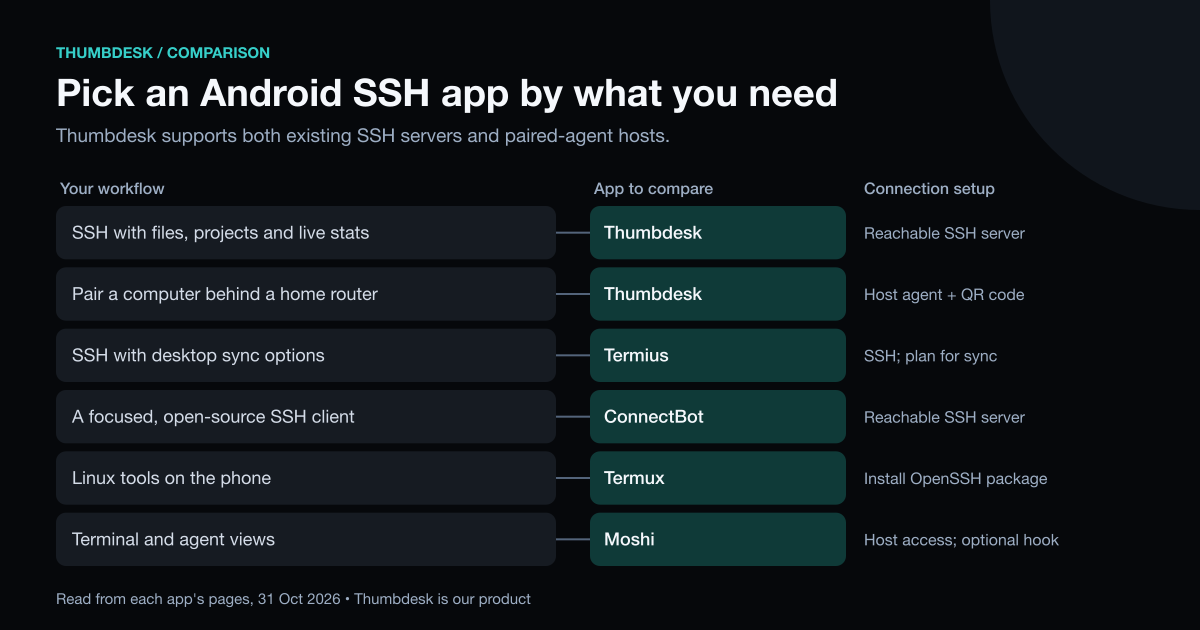
| App | A reason to consider it | Connection setup |
|---|---|---|
| Thumbdesk | SSH terminal, files, projects and stats; paired-agent access is also available | SSH credentials for reachable servers, or QR pairing with its host agent |
| Termius | SSH and SFTP with desktop sync and team options | SSH access; sync and team features depend on plan |
| ConnectBot | A free, open-source Android SSH client | SSH access |
| Termux | A Linux command-line environment on the phone | Install OpenSSH and the other packages you want |
| Moshi | SSH, Mosh and ET with terminal and coding-agent features | Host access; moshi-hook adds structured agent features |
Two ways to connect with Thumbdesk#
Add an existing SSH server#
Add an SSH host with its address, username and password or private key. Verify the server's host-key fingerprint when connecting for the first time. You can then open a terminal, browse and transfer files over SFTP, edit text files, inspect projects and read live stats.
Nothing needs installing on the server for those tools. Coding-agent chat also works on supported POSIX SSH hosts when the relevant CLI is available and authenticated there.
The server needs to be reachable from your phone, through your local network, a public address or an existing VPN. This is ordinary SSH access, so installing the phone app does not change the server's network configuration.
Pair a computer with the host agent#
For a computer at home that you cannot reach directly, install the Thumbdesk agent using the download instructions. Run thumbdesk pair on the computer and scan its QR code with the app.
The agent connects outward, which handles access behind a router without opening an inbound port or configuring a VPN. It also adds screen sharing, background alerts, widgets and dev-server preview. The computer must be awake, online and running the agent.
You can keep SSH hosts and paired-agent hosts in the same list. Use SSH for an existing server, then pair your home machine without changing how you connect to the server.
A practical server workflow#
Suppose a development service needs attention. Open its host, check CPU and memory, then open the terminal to inspect the service. Browse its configuration in Files, make the edit and return to the terminal to restart it. Project tools let you inspect git changes before committing.
The terminal key bar includes Ctrl, Alt, Esc, Tab and arrows. Snippets help with commands you repeat. On paired-agent hosts, notifications and widgets can help you keep track of the machine between visits.
Keep a long command running#
Android can suspend a background app, so put the session on the server. Thumbdesk's agent owns its terminal sessions and lets the app reconnect after a phone disconnect. SSH hosts use tmux for persistent terminals when it is available on the server.
This protects work from a dropped phone connection. A reboot of the server is a separate event. Our guide to keeping sessions alive covers tmux and the other approaches.
Other Android terminal options#
Termius#
Termius includes SSH, SFTP and port forwarding in its free Starter plan. Pro adds a cloud vault and desktop/mobile sync; team plans add shared access tools. It is worth comparing when you want the same host configuration across mobile and desktop.
ConnectBot#
ConnectBot is a free, open-source SSH client for Android. Consider it for a focused SSH workflow without a broader host-management app.
Termux#
Termux runs a Linux environment on Android. Install OpenSSH, git, Python and other packages, then use them from the phone's command line. It suits people who want local tools as well as remote shells.
Moshi#
Moshi supports SSH, Mosh and ET. Its moshi-hook companion adds agent chat views, diffs and dev-server previews. Consider it when your workflow centres on terminal multiplexers and coding agents.
Try it with one machine#
Download Thumbdesk and add an SSH server you already use, or pair a computer with the agent. Free includes two hosts, live stats and file transfers up to 5 MB each. Paired hosts also get two active alerts and two minutes of screen sharing per hour, subject to the account's shared limits. See pricing for the full list.
Product details were checked against the app and host implementation. External descriptions use the linked projects' own pages, checked on 31 October 2026. See our methodology and corrections.
Figures in this post were read on 31 October 2026 and may have changed since.