How to keep an SSH session alive on your phone
Keep terminal work running when your phone disconnects. Set up a persistent Thumbdesk session, tmux over SSH, or Mosh for changing networks.

Founder, Thumbdesk · 6 min read
TL;DR: Keep the terminal session on the computer you connect to, so phone sleep or a network change does not stop its work. Thumbdesk's host agent manages persistent terminals and reconnects when you return to the app. For an existing SSH setup, tmux keeps a shell running on the server, and Mosh helps with changing networks. We build Thumbdesk; this guide shows how each approach works and what to set up.
How do you keep an SSH session alive on your phone?#
Move the session off the connection, because the connection will drop. First it helps to know why it drops.
Why SSH disconnects when you lock your phone#
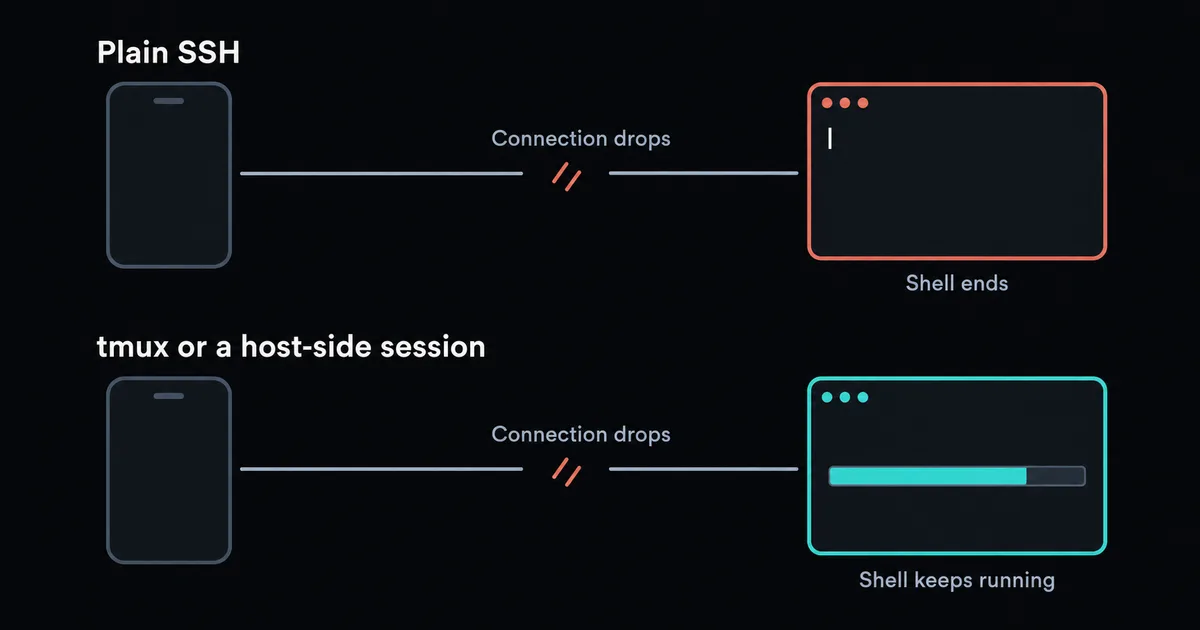
SSH runs over one TCP connection, and a shell started that way usually ends when the connection does. On a laptop that connection can sit open for days. Phones can suspend background apps, interrupting the connection even while the server is healthy.
Termius, one of the largest SSH apps, says recent iOS versions stop background activity almost immediately, usually within 20 to 30 seconds. Android is usually more forgiving, but battery savers differ by manufacturer, as Don't Kill My App records. Changing from Wi-Fi to mobile data also breaks a plain TCP connection, because the phone's address changes.
Keep-alive settings do not solve this. ServerAliveInterval helps a connection survive an idle network path, but it cannot run an app the phone has suspended.
Which fix should you use?#
| Approach | Survives a dropped connection | Survives Wi-Fi to mobile data | Output history | What you set up |
|---|---|---|---|---|
| tmux or screen | Yes, reattach by hand or script | Yes, reattach | Configurable server-side history | One package on the server |
| Host-side session (Thumbdesk agent) | Yes, reconnect to the session | Yes, after reconnecting | Recent output and scrollback | The agent, paired by QR code |
| Mosh | Yes | Yes, without reconnecting | No, visible screen only | Mosh on the server, open UDP ports |
| Mosh plus tmux | Yes | Yes | Configurable tmux history | Both |
How to use tmux from a phone#
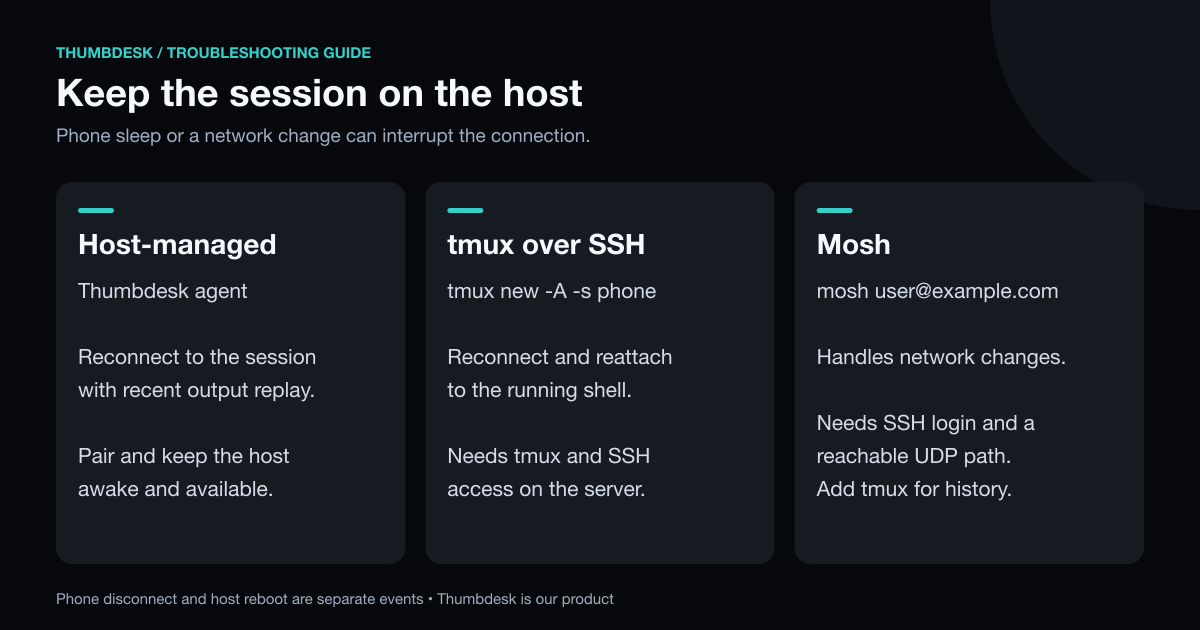
tmux runs your shell on the server, so it does not care whether anyone is connected. Install it, then connect with one command that attaches to a session or creates it:
sudo apt install tmux      # Debian, Ubuntu, Raspberry Pi OS
tmux new -A -s phone       # attach to "phone", or create it
Close the app, lose signal, come back, and run the same command. Your programs kept running. Many apps can run this automatically on connect. Termius describes a startup snippet for it.
tmux's scrollback and windows are driven by keyboard shortcuts, which are awkward on a phone. Turning on mouse mode with set -g mouse on in ~/.tmux.conf lets many apps scroll by swiping.
How a host-side session works#
A host-side session does tmux's job for you. Thumbdesk's agent runs on your computer and owns the terminal, so your programs keep running when the phone goes away. Reopen the app and it re-attaches by itself, with the screen and scrollback restored, with recent output replayed from the host's bounded buffer. There is no command to remember, and you scroll with your finger.
curl -fsSL https://thumbdesk.com/install.sh | bash   # Linux or Apple Silicon Mac
thumbdesk pair                                       # prints a QR code to scan
Because the agent connects outward, this also solves reaching a machine behind a home router, so the same setup handles network reachability and terminal persistence. Keep the host awake, online and running the agent. Host reboot, explicit session closure and phone disconnect are different events; a persistent terminal does not promise to survive all of them.
On a server where you cannot install anything, add it to Thumbdesk as an SSH host. Each terminal then runs in its own tmux session when tmux is available, so you get the same resume with no agent.
How to use Mosh#
Mosh replaces the TCP connection after login with its own protocol over UDP. It stays connected when you change networks, and it answers your typing locally, which makes slow links feel better.
sudo apt install mosh
sudo ufw allow 60000:61000/udp    # if you use ufw
mosh user@example.com
It needs a reachable UDP path after SSH login. For a machine behind a home router, arrange that path through your network or VPN setup. It also synchronises only the visible screen, and its own site suggests running tmux or screen on top for scrollback. You need a phone client that supports it, and our guide to mobile terminal apps compares them.
What if you forgot to start tmux?#
A job started in a normal desktop terminal is separate from a new persistent session. If you forgot to use tmux, first check whether the original job is still running before starting another copy.
With Thumbdesk paired, you still have options from your phone:
- Look at the window. Open the machine's screen and see the terminal you left open at your desk.
- Find existing sessions. Browse the tmux or screen sessions discovered on the host and open the one you need.
- Start new work in a persistent terminal. Once you have checked the original job, open a host-managed terminal for the next command.
Terminals created through the paired agent keep running across phone disconnects. Reconnect to the existing session when you return.
How do you know when a long job finishes?#
Keeping a session alive is half of it. The other half is not having to check every few minutes. Thumbdesk can push to your phone when a command finishes or a program waits for input, so you can lock the phone and get on with your day. With plain SSH you can end a command with a call to a notification service such as ntfy.
What to do when a session keeps dying#
| What you see | Likely reason | What to do |
|---|---|---|
| The session ends soon after you switch apps | The phone suspended the app, so the connection closed | Run tmux, or use a host-side session |
| The session ends when you leave Wi-Fi | The phone's address changed | Reattach to tmux, use Mosh, or use a host-side session |
| A long job stopped when you disconnected | It was started outside tmux | Start long jobs inside tmux, or use a host-side session |
| Mosh logs in, then shows nothing | Its UDP ports are closed | Open 60000 to 61000/udp on the server |
| You cannot scroll back in Mosh | Mosh synchronises only the visible screen | Run tmux inside Mosh |
| Swiping does nothing in tmux | tmux scrolls with keyboard shortcuts | Add set -g mouse on to ~/.tmux.conf |
Which one should you choose?#
Use Thumbdesk's host-managed terminals when you want persistent sessions and paired access in the same app. Use tmux with an existing SSH client when you want to keep that setup, and add Mosh when a roaming terminal suits your network. Try disconnecting and reopening a harmless test session before trusting a long job to the setup.
You can type in Thumbdesk's terminal in your browser on our home page, with nothing to install, then download it free for 2 machines.
Figures in this post were read on 31 October 2026 and may have changed since.