How to monitor a Linux server from your phone
Monitor a Linux server from your phone: live CPU, memory, disk and temperature, push alerts and a terminal to fix it, plus how Netdata and Uptime Kuma compare.

Founder, Thumbdesk · 4 min read

TL;DR: Pair a Linux server with Thumbdesk to see live resource use, receive threshold alerts and open a terminal when something needs attention. You can check which process is busy, inspect the files behind a storage alert and act from the same phone app. We build Thumbdesk; Free supports two hosts and two active alerts. This guide sets up a useful first alert and explains where uptime and detailed-metrics tools fit.
How to monitor a Linux server from your phone#
Start with one machine and one question you want answered. For example: is the disk running out of space, is a process using more CPU than expected, or has the host gone offline?
1. Pair the server#
Install the host agent using the Linux download instructions, run thumbdesk pair and scan its QR code with the phone app. The agent handles connectivity behind a home router without opening an inbound port.
Keep the server online and the agent running. Setup attempts to configure automatic startup; check its service status and test a reboot if you need unattended access after restarts.
2. Check the current readings#
Open Monitor and select the host. Read CPU, memory, disk and network use, and temperature where the hardware reports it. Open the process list to investigate a busy machine. Home-screen widgets give you another way to check paired hosts.
Use the readings as a starting point for investigation. A CPU spike can be normal during a build; memory figures need interpreting alongside the workload and available memory. Check the storage volume where your application actually keeps its data.
3. Add a disk alert#
- Open the host's Alerts sheet in Monitor.
- Choose Add Alert Rule and select Disk.
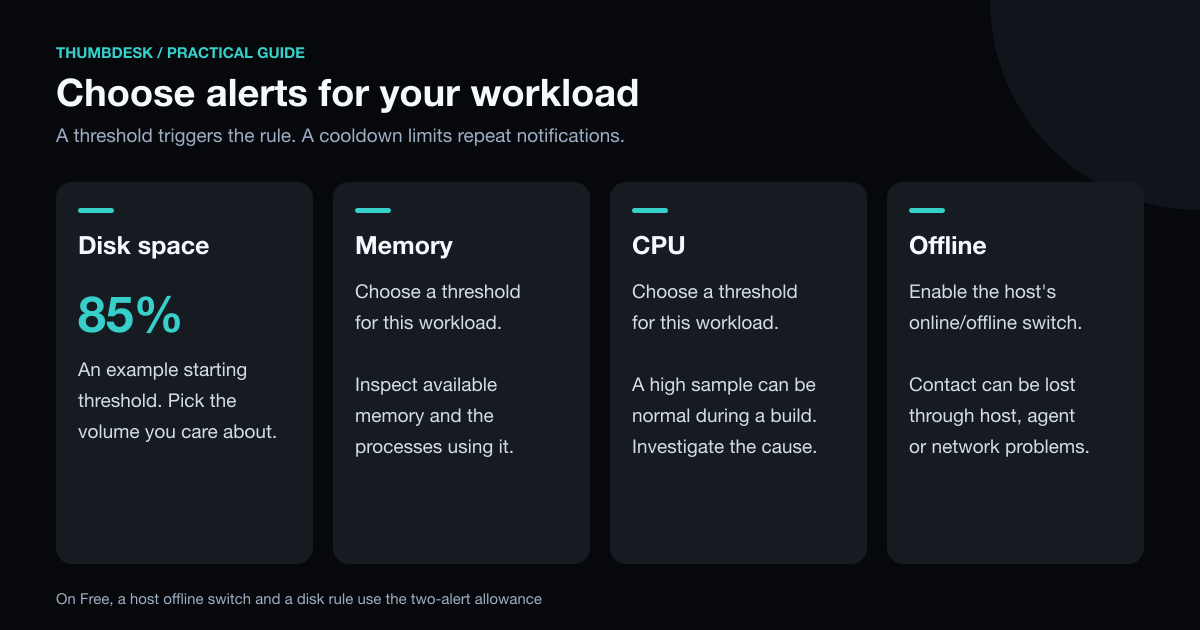
- Select the volume, enter a threshold such as 85 percent and choose a cooldown.
- Save the rule and enable notifications on your phone.
The threshold triggers when a reported value crosses the configured level. The cooldown controls how soon that rule can notify you again; it does not require the value to remain high for a specified duration.
Online/offline notifications are a separate host switch. On Free, each enabled host switch and each active threshold rule counts toward the two-alert total. For one server, a disk rule and an offline notification are useful starting choices.
Investigate from the alert#
Suppose the disk alert arrives. Open the host's storage view to identify the volume, then inspect the affected folders in Files or the terminal. Check which files are growing and why. Rotate or archive logs using the application's normal tools, or remove files you have confirmed are safe to discard.
For a busy process, inspect its command and resource use before deciding whether to stop it. For a failed service, read its status and logs in the terminal before restarting it. The value of having these tools together is being able to follow the problem through, from the notification to the cause.
An offline notification tells you the service has lost contact with the agent. It can reflect a network problem or stopped agent as well as a powered-off machine. You can investigate remotely once the host is reachable again.
When to add another monitoring tool#
| Tool | The question it helps answer | Setup |
|---|---|---|
| Thumbdesk | What is happening on my host, and how can I act on it? | Paired agent for background alerts; SSH also supports live stats |
| Uptime Kuma | Can another machine reach my website or service? | Run the monitor separately from the service being watched |
| Netdata | Which detailed metrics explain the behaviour over time? | Install its agent and choose the retention and plan you need |
| ServerCat | Can I check server status and Docker from an Apple device? | Configure SSH access |
Uptime Kuma is a self-hosted availability monitor with notification integrations. Run it elsewhere so an outage on the server does not also take down its monitor. Netdata offers detailed metrics and history; check its current plans for the scale you need. ServerCat combines SSH, server status and Docker management on iOS and macOS.
These tools can complement remote access. An external website check and the host's own resource readings answer different questions.
Try one alert first#
Download Thumbdesk, pair a server and check its live stats. Add a rule for a measurement you care about, then adjust the threshold and cooldown based on the notifications you receive. Pro adds stats history and expanded alert limits; see pricing.
For a machine on your home network, our access guide explains the connection options. Product details were checked against the app and host implementation; external descriptions use the linked project pages, checked on 31 October 2026.
Figures in this post were read on 31 October 2026 and may have changed since.