8 Best Mobile Terminal & Coding-Agent Apps (2026)
Compare eight mobile terminal and coding-agent apps for Android and iPhone, including free options, connection setup, persistent sessions and project tools.

Founder, Thumbdesk · 7 min read
TL;DR: The best mobile terminal app depends on how you connect and what you do after opening a shell. Thumbdesk combines persistent terminals, coding-agent chat, files, git, previews and monitoring on your own machines. Termius, Blink Shell, Moshi, Happy, ServerCat, ConnectBot and Termux cover other terminal and agent workflows. We build Thumbdesk. This guide compares eight options by their purpose and setup, so you can choose one to try with a real task.
What are the best mobile terminal apps for your workflow?#
Start with three questions. Can your phone reach the computer? What happens to your work when the phone disconnects? Which other tools do you need to finish the task?
For a computer behind a home router, paired-agent access can handle reachability. An SSH client needs an existing network path. For long-running commands, use a host-managed terminal or a multiplexer such as tmux. Then compare the file, project or agent tools you actually use.
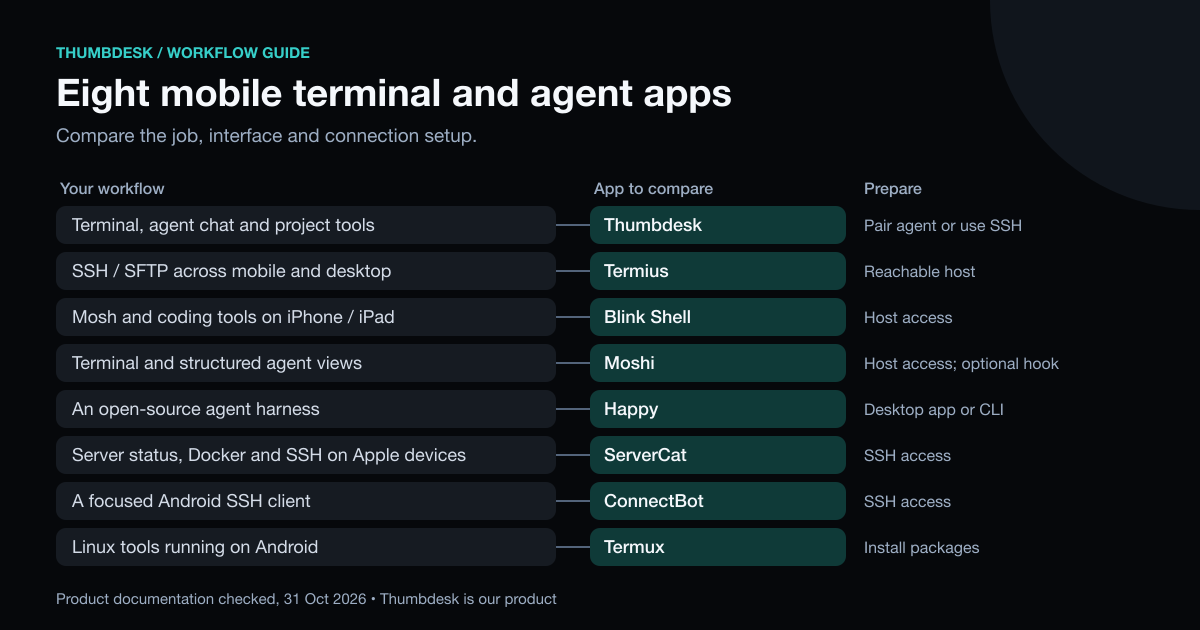
| App | Phone platforms | Main workflow | Free or paid | Connection and persistence |
|---|---|---|---|---|
| Thumbdesk | iOS, Android | Terminal, coding-agent chat, files, git and preview | Free for two hosts; Pro or Lifetime | QR-paired agent with host-managed terminals, or reachable SSH with tmux |
| Termius | iOS, Android | SSH/SFTP across mobile and desktop | Free Starter; paid sync and team plans | Reachable SSH host; tmux for persistent shell work |
| Blink Shell | iPhone, iPad | SSH, Mosh and coding tools | Paid; check current plans | Reachable host; Mosh and host terminal tools |
| Moshi | iOS, Android | Terminal and structured agent views | Free and paid options | SSH, Mosh or ET; moshi-hook for agent features |
| Happy | iOS, Android | Open-source coding-agent harness | Free core app | Desktop app or original CLI on the host |
| ServerCat | iOS | SSH, server status and Docker | Check current app purchases | Reachable SSH host |
| ConnectBot | Android | Focused SSH client | Free, open source | Reachable SSH host; tmux for persistence |
| Termux | Android | Linux tools running on the phone | Free, open source | Local processes; install OpenSSH or Mosh for remote access |
1. Thumbdesk: continue a task from your phone#
Pair a computer with the host agent and open its terminal, project or Chats view. For example, ask Codex to fix a bug, inspect the git diff and open a preview of the app running on that computer. Or check a server's live stats and open its terminal to investigate a busy process.
The host agent manages persistent terminals, so a phone disconnect leaves the session running. It also handles network reachability behind a router. Keep the machine awake, online and running the agent. Screen sharing requires capture and input permissions on a graphical host.
You can also add ordinary SSH hosts for terminal, files, stats and projects. Supported POSIX SSH hosts offer agent chat when the relevant CLI is installed and authenticated. Agent hosts add background alerts, widgets, dev preview and screen sharing.
Free supports two hosts, the latest ten agent sessions and files up to 5 MB each. Screen sharing includes two minutes per hour. The pricing page lists the remaining limits, Pro at $4.99 a month or $39.99 a year, and the $99 Lifetime option.
2. Termius: SSH and SFTP across devices#
Termius offers SSH, SFTP and port forwarding in its free Starter plan. Paid plans add features such as a cloud vault, sync and team collaboration. It has mobile and desktop clients, which matters if you want a consistent host-management workflow across devices.
Your phone still needs a network path to the SSH server. For a long-running command, check the host's tmux setup rather than assuming that reconnecting the client preserves every shell process. Our Termius comparison covers the difference between existing SSH access and Thumbdesk's paired hosts.
3. Blink Shell: SSH and Mosh on iPhone and iPad#
Blink Shell combines SSH, Mosh and coding tools on Apple mobile devices. Mosh is relevant when you move between networks or have an intermittent connection; a host multiplexer remains useful for persistent terminal work.
Compare it for an iPad or iPhone terminal workflow, including its browser-based coding tools. It does not provide an Android client. Check its current subscription options before buying; a yearly plan is different from a lifetime purchase.
4. Moshi: terminal and coding-agent views#
Moshi connects over SSH, Mosh or ET. Its moshi-hook integration adds structured coding-agent views, diffs and previews alongside terminal access on iOS and Android.
Check both the connection setup and the agent integration. Reaching a private machine is still part of your SSH or network configuration, and structured agent features need the hook. Review its free and paid feature split for the particular views you want.
5. Happy: a free, open-source agent harness#
Happy has desktop and mobile apps for coding-agent work, with an MIT-licensed core. Its older CLI remains a separate setup option. Compare starting a conversation, returning to it on the phone and reviewing the result.
An agent conversation and a general-purpose host terminal serve different tasks. If you also need to edit a server configuration or inspect a process yourself, include that task in your trial. Our Happy comparison covers Thumbdesk's chat, terminal and project workflow beside the current Happy harness.
6. ServerCat: SSH and server status on Apple devices#
ServerCat combines SSH, server status and Docker management on iOS and macOS. It is relevant when looking after servers and containers is the main job you want beside your shell.
Check the available app purchases and the specific management features you need. Its Apple-device focus also matters when choosing for an Android phone.
7. ConnectBot: a free Android SSH client#
ConnectBot is a free, open-source SSH client for Android. It suits opening a remote shell when you already have the server address, credentials and network access.
For work that must survive a phone disconnect, run it in tmux on the server. ConnectBot provides the SSH interface; you arrange private-network access and the other project or monitoring tools you need.
8. Termux: Linux tools on Android itself#
Termux gives Android a local Linux environment with packages such as git, Python and OpenSSH. You can work locally on the phone or install an SSH client to reach another computer.
That is a different starting point from a saved-host manager. You assemble the packages and commands yourself. A local Termux process runs on the phone; a command launched through SSH runs on the remote host.
What about reaching a private machine?#
A terminal client needs a route to its host. Tailscale SSH adds identity-based SSH within a private network; you still use a terminal interface on the phone. Thumbdesk's paired-agent mode provides its own connection to the host. Our home-server access guide compares those approaches.
Try a complete task#
Use the same small job to evaluate an app: connect to a host, run a command, switch away, reconnect and retrieve the result. For coding agents, also inspect the diff or preview. That shows how the pieces work together.
Questions people ask#
What is the best mobile terminal app for Android?#
Compare Thumbdesk for terminal, agent chat and project tools on your own machines; Termius for an SSH/SFTP workflow; and ConnectBot for a focused free SSH client. Termux is useful when you want Linux tools running on Android itself. Start with whether the work runs on the phone or on a remote computer.
What is the best mobile terminal app for iPhone?#
Thumbdesk brings terminal, chat, files, git and monitoring together on paired or SSH hosts. Blink Shell adds an SSH/Mosh workflow on iPhone and iPad, Termius has mobile and desktop clients, and Moshi combines terminal access with structured agent views. Test the connection and task you expect to use most.
What's the best free option?#
Thumbdesk Free supports two hosts with terminal, files, live stats and access to the latest ten agent sessions. Termius Starter includes SSH, SFTP and port forwarding. ConnectBot and Termux are free, open-source Android options; Happy's core agent app is also free. These cover different jobs, so compare the included workflow as well as the price.
Which is best for Claude Code specifically?#
Thumbdesk lets you start or continue Claude Code conversations and check files, git changes and previews on the host. Anthropic Remote Control connects local Claude Code to the Claude app or browser. Happy and Moshi offer other agent interfaces. The Claude Code guide explains setup and existing-session handling.
Which options offer a one-time purchase?#
Thumbdesk Lifetime is $99 once for Pro; pricing explains what it includes. Moshi also lists a lifetime option on its site; check the current offer and terms. Blink Shell's yearly subscription is a recurring purchase. Separate an app purchase from the coding agent's own usage costs.
Do any work without SSH keys or port forwarding?#
Thumbdesk's paired-agent mode uses a QR code and handles host reachability without an inbound router rule. Happy has its own device-connection setup. An ordinary SSH client needs a reachable server and credentials, which may be a password or key; a private network such as Tailscale can provide the route.
Download Thumbdesk to try that workflow with a paired computer or existing SSH server. The Claude Code guide and Codex guide cover starting agent work.
We checked Thumbdesk details against its implementation and external descriptions against the linked product pages on 31 October 2026. See our methodology and corrections.
Figures in this post were read on 31 October 2026 and may have changed since.